Design a Code Deployment System: CI/CD, Canary and Rollback
Solve the code deployment system design interview: build pipelines, artifact storage, canary releases, blue-green deploys, rollback, and observability.
Problem Statement
Design a code deployment system (like Spinnaker or AWS CodeDeploy) that takes code from a repository, builds it, runs tests, and deploys it to production using safe rollout strategies (canary, blue-green, rolling). The system must support automated rollback on error detection, artifact versioning, and multi-region deployment for thousands of microservices.
Requirements
Functional
- Build pipeline: on git push, compile code, run unit/integration tests, build container image, push to artifact registry
- Deployment strategies: canary (route 5% traffic to new version), blue-green (instant switch), rolling (gradual pod replacement)
- Automated rollback: detect error rate increase (>1% 5xx) during canary and automatically roll back
- Artifact management: version, tag, and promote container images through environments (dev -> staging -> prod)
Non-Functional
- Speed: Build + test completes in <10 minutes for most services
- Safety: No bad deployment reaches more than 5% of production traffic without human approval
- Scale: 5000 microservices, 500 deployments/day, multi-region (3+ regions)
- Reliability: Deployment system itself must be 99.99% available
Core Architecture
-
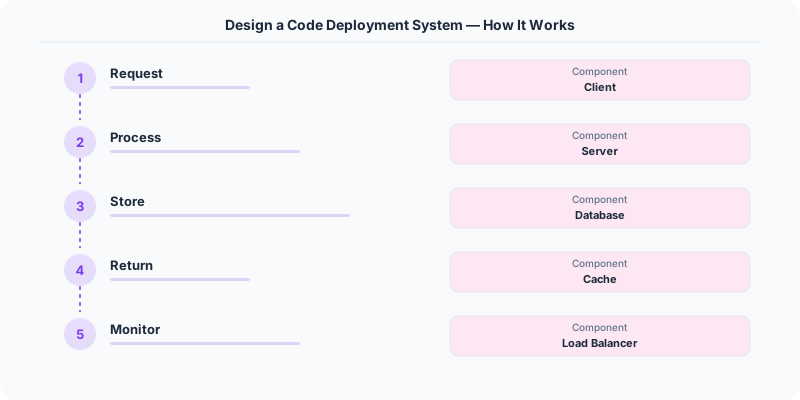
Build Service -- Triggered by git webhook. Pulls code from the repository, runs the build in an ephemeral container (Docker-in-Docker or Kaniko for rootless builds). Executes unit tests, integration tests, linting, and security scans in parallel stages. On success, builds a container image tagged with git SHA and pushes to the artifact registry (e.g., ECR, GCR). Build logs are streamed in real time.
-
Deployment Orchestrator -- Manages the deployment lifecycle. Receives a deployment request (service, version, strategy, target environment). For canary: creates a small deployment (5% of pods) running the new version behind the same load balancer, configures traffic splitting (Istio/Envoy), starts the monitoring window. For blue-green: provisions the green environment, runs health checks, switches the load balancer atomically.
-
Rollback Controller -- Monitors the canary deployment using metrics from the observability stack (Prometheus/Datadog). Compares error rate, latency p99, and custom health metrics between canary and baseline. If canary error rate exceeds baseline by >1% during the observation window (10-30 minutes), automatically rolls back by draining canary pods and restoring 100% traffic to the previous version. Pages the on-call engineer.
- Artifact Registry and Promotion Pipeline -- Stores container images with immutable tags (git SHA). Promotion flow: an image built in CI is tagged "dev", manually promoted to "staging" after QA, then to "prod" after staging validation. Each promotion is audited (who promoted, when, approval chain). Old images are garbage-collected after 90 days.
Database Choice
PostgreSQL for deployment records (service, version, strategy, status, timestamps, rollback history), pipeline definitions, and audit logs. S3 for build logs and artifacts. Redis for pipeline status caching (which builds are running, queue depth) and distributed locks (prevent concurrent deployments of the same service). Kafka for deployment events consumed by the notification service (Slack alerts) and metrics aggregator.
Key API Endpoints
POST /api/v1/deployments
  -> Body: \{ service: "order-service", version: "abc123", strategy: "canary", canary_percent: 5, regions: ["us-east-1", "eu-west-1"] \}
  -> Returns: \{ deployment_id: "D-456", status: "IN_PROGRESS" \}

GET /api/v1/deployments/\{deployment_id\}/status
  -> Returns: \{ status: "CANARY_MONITORING", canary_error_rate: 0.2, baseline_error_rate: 0.15, time_remaining_min: 18 \}

POST /api/v1/deployments/\{deployment_id\}/promote
  -> Returns: \{ status: "ROLLING_OUT", progress: "5% -> 25% -> 50% -> 100%" \}
Scaling Insight
Progressive canary with automated promotion gates is the key safety mechanism. Instead of deploying to 5% and waiting for a human, the system uses a multi-stage canary: 5% for 10 minutes -> if healthy, 25% for 10 minutes -> 50% for 5 minutes -> 100%. At each gate, automated health checks compare canary vs. baseline metrics. A bad deploy is caught at 5% with only ~50ms of user impact (5% * average error duration). The entire rollout completes in 25 minutes with zero human intervention for healthy deployments.
Key Tradeoffs
| Decision | Option A | Option B | Chosen |
|---|---|---|---|
| Strategy | Blue-green (instant switch) | Canary (gradual rollout) | Canary default -- catches issues before full exposure; blue-green for database migrations |
| Rollback trigger | Manual (human decides) | Automated (metric-based) | Automated with manual override -- faster response (seconds vs. minutes), human can halt if needed |
| Build isolation | Shared build servers | Ephemeral containers per build | Ephemeral -- no state leakage between builds, reproducible, no "works on the build server" issues |
Practical Implementation for .NET Developers
In a .NET application, you would typically implement this pattern using the following approach:
ASP.NET Core setup: Create a service class that encapsulates the logic, register it with dependency injection, and inject it into your controllers or minimal API endpoints. The built-in DI container handles lifecycle management.
Entity Framework Core: For database interactions, EF Core provides the ORM layer. Use migrations for schema management and raw SQL for performance-critical queries. Consider Dapper for read-heavy paths where EF Core's overhead matters.
Azure integration: If deploying to Azure, leverage managed services — Azure Cache for Redis, Azure SQL, Azure Service Bus, Azure Cosmos DB. These eliminate operational overhead and provide built-in monitoring through Application Insights.
Testing: Use xUnit with Testcontainers for integration tests that spin up real databases in Docker. Mock external dependencies with NSubstitute. The WebApplicationFactory class lets you test your entire HTTP pipeline in-process.
Monitoring: Add Application Insights telemetry to track request latency, dependency calls, and custom metrics. Use structured logging with Serilog to make production debugging possible:
Log.Information("Processing order {OrderId} for {CustomerId}", orderId, customerId);
This gives you searchable, structured logs in Azure Monitor or Seq.

System-Specific Clarifying Questions
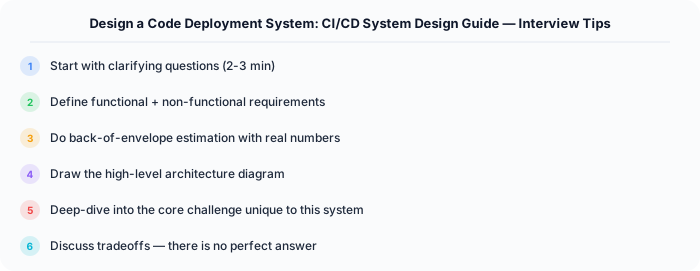
Before designing Code Deployment, ask questions specific to THIS system:
- Who are the primary users? Understanding the user base shapes every technical decision — consumer apps have different requirements than enterprise B2B systems.
- What is the read-to-write ratio? This determines whether you optimize for fast reads (caching, denormalization) or fast writes (write-ahead logs, async processing).
- What is the geographic distribution? Users in one country vs. global users fundamentally changes your data replication and CDN strategy.
- What is the acceptable latency? Some features need sub-100ms responses, others can tolerate seconds. This determines your caching and architecture strategy.
- What is the consistency requirement? Some data (payments, inventory) needs strong consistency. Other data (social feeds, recommendations) can be eventually consistent.
Architecture Deep Dive
The architecture for Code Deployment should be designed around the specific access patterns of the system. Do not apply generic templates — every system has unique hotspots, bottlenecks, and scaling challenges.
Write Path: How does data enter the system? Is it bursty (event-driven, flash sales) or steady (sensor data, logs)? Bursty writes need queuing and backpressure. Steady writes can go directly to the database.
Read Path: How is data consumed? Is it fan-out (one write, many reads like social feeds) or point lookups (one read for specific data like user profiles)? Fan-out reads benefit from pre-computation and caching. Point lookups benefit from efficient indexing.
Hot Spots: Where are the bottlenecks? For Code Deployment, identify the component that will fail first under load and design mitigation strategies: caching, sharding, rate limiting, or async processing.
Sources
Why this matters for system design interviews
Design a Code Deployment System matters because deployment systems safely move code from commit to production with rollback controls. In interviews, explain the user-facing requirement first, then identify the bottleneck, failure mode, or scale constraint that forces this design choice.
A strong answer should cover the baseline design, the first scaling bottleneck, operational failure modes, and the tradeoff you accept. Avoid naming a tool before explaining the system property it solves.
Related study path: