Design Notification Service
System design interview solution for Design Notification Service. Includes requirements, API design, data model, architecture, scaling strategy, and.
Quick answer: Design Notification Service
Design Notification Service is covered here as a practical system design interview problem. System design interview solution for Design Notification Service. Includes requirements, API design, data model, architecture, scaling strategy, and. Use it to practice requirements, APIs, storage choices, scaling bottlenecks, data consistency, observability, and failure handling for a medium interview round.
Focus on the problem being solved, the main design choice, the failure mode, and the tradeoff you would defend in front of a senior engineer. This page is part of the DosiBridge system design knowledge graph, so it links related concepts, interview problems, tradeoffs, and references instead of leaving the topic isolated.
Problem Statement
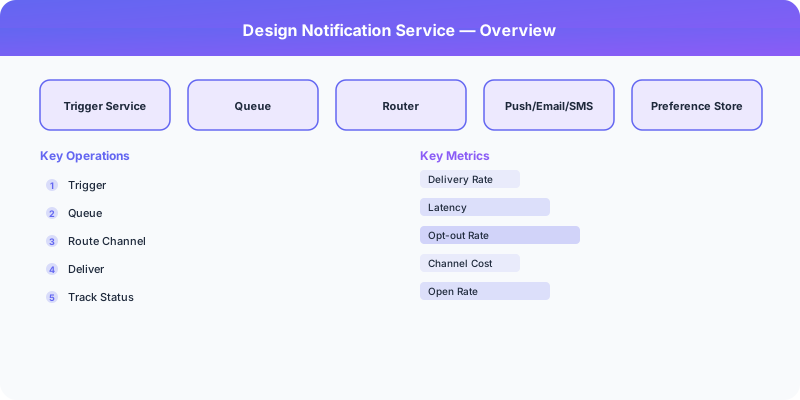
Design Notification Service as a fan-out system where freshness, delivery order, and hot users create the real scaling pressure. For Design Notification Service, name the critical user action, the data that must remain correct, and the first bottleneck that appears when traffic grows.
Deep-Dive: Clarifying Questions for Notification Service
- What notification channels? Push notifications (iOS APNs, Android FCM), email (SMTP), SMS (Twilio/SNS), in-app notifications, and webhooks. Each channel has different delivery guarantees and costs.
- What is the volume? A large platform sends 1-10 billion notifications per day. Most are push notifications; email and SMS are an order of magnitude less.
- Do we need priority levels? A security alert (password changed) is high priority and must be delivered immediately. A "someone liked your photo" notification can be batched and delayed.
- Do we need rate limiting per user? Users should not receive more than N notifications per hour to avoid notification fatigue and uninstalls.
- How do we handle user preferences? Users should be able to opt out of specific notification types per channel (e.g., receive likes via push but not email).
- Do we need notification templates? Localized templates with variable substitution for consistent messaging across channels.
Specific Functional Requirements
- Multi-Channel Delivery: Send notifications via push (iOS/Android), email, SMS, in-app, and webhooks
- Priority Queuing: High-priority notifications (security alerts, OTPs) are delivered immediately; low-priority ones can be batched
- User Preferences: Per-user settings for which notification types they receive on which channels
- Rate Limiting: Limit notifications per user per time window to prevent notification fatigue
- Template Engine: Localized notification templates with variable substitution
- Delivery Tracking: Track sent, delivered, opened, and clicked status per notification
- Retry and Failover: Retry failed deliveries with exponential backoff; fall back to alternate channels
Specific API Endpoints
POST /api/v1/notifications/send
  Body: {
    "user_id": "user_123",
    "type": "like_photo",
    "priority": "low",
    "data": { "liker_name": "Alice", "photo_id": "p456" },
    "channels": ["push", "in_app"]
  }
  Response: { "notification_id": "n789", "status": "queued" }

POST /api/v1/notifications/send-bulk
  Body: { "user_ids": ["user_1", "user_2", ...], "type": "new_feature", "data": {...} }
  Response: { "batch_id": "batch_abc", "queued_count": 50000 }

GET /api/v1/users/:user_id/notifications?unread=true&limit=20
  Response: { "notifications": [...], "unread_count": 5 }

PUT /api/v1/users/:user_id/notification-preferences
  Body: { "like_photo": { "push": true, "email": false, "sms": false }, "security_alert": { "push": true, "email": true, "sms": true } }

Specific Data Model
Notification Queue (Kafka): Topics partitioned by priority (high, medium, low). High-priority topic has more partitions and dedicated consumers for faster processing.
Notification Log (Cassandra)
| Column | Type | Notes |
|---|---|---|
| user_id | BIGINT | Partition key |
| notification_id | TIMEUUID | Clustering key |
| type | VARCHAR | like_photo, comment, follow, security_alert |
| channel | VARCHAR | push, email, sms, in_app |
| status | VARCHAR | queued, sent, delivered, opened, failed |
| data | JSON | Template variables |
| created_at | TIMESTAMP | |
| delivered_at | TIMESTAMP | Nullable |
User Preferences (PostgreSQL)
| Column | Type | Notes |
|---|---|---|
| user_id | BIGINT | Primary key |
| preferences | JSONB | Map of notification_type -> channel -> enabled |
| quiet_hours_start | TIME | Do not disturb start |
| quiet_hours_end | TIME | Do not disturb end |
| timezone | VARCHAR | For quiet hours calculation |
Device Registry (Redis/PostgreSQL): Maps user_id to device tokens for push notifications. Users may have multiple devices.
Specific Back-of-the-Envelope Numbers
Traffic:
- 500M DAU generating ~10 notification-triggering events each = 5 billion notification requests/day
- After preference filtering and deduplication: ~2 billion actual deliveries/day
- Push notifications: ~1.5B/day (70%), in-app: 400M (20%), email: 150M (7%), SMS: 50M (3%)
- Average: ~23,000 notifications/second, peak: ~70,000/second
Processing:
- Each notification: check preferences (Redis lookup), apply rate limit (Redis counter), render template, route to channel
- Processing time per notification: ~5ms
- Need ~350 worker instances at peak to maintain under 1-second queue latency
Storage:
- Notification log: 2B/day * 200 bytes = 400 GB/day, retained for 90 days = 36 TB
- User preferences: 500M users * 1 KB = 500 GB (fits in a single PostgreSQL instance with read replicas)
External provider limits:
- APNs (Apple): effectively unlimited but throttles per device token
- FCM (Google): 240 messages/minute per device, up to 500 topics per app
- Email (SES): 50,000 emails/day on standard, need dedicated IPs for higher volumes
- SMS: $0.0075 per message (US) — expensive at scale, use sparingly
Original DosiBridge notes for Design Notification Service
This section is written specifically for this page, not copied from a general system-design checklist. The useful way to study Design Notification Service is to connect the concept to a fan-out system where freshness, delivery order, and hot users create the real scaling pressure. That framing changes the design discussion from definitions to operating choices.
What makes this topic distinct
- Core Entity: For Design Notification Service, decide the core entity before choosing tools; otherwise the design looks clean but fails when notification changes.
- Read/Write Path: For Design Notification Service, decide the read/write path before choosing tools; otherwise the design looks clean but fails when service changes.
- Contention Point: For Design Notification Service, decide the contention point before choosing tools; otherwise the design looks clean but fails when notification changes.
- Abuse Path: For Design Notification Service, decide the abuse path before choosing tools; otherwise the design looks clean but fails when service changes.
- Recovery Workflow: For Design Notification Service, decide the recovery workflow before choosing tools; otherwise the design looks clean but fails when notification changes.
Design Notification Service correctness boundary
For this problem, separate the user-visible action from background work. The correctness boundary is the smallest state transition that must not be duplicated, lost, or reordered. Naming that boundary makes the solution more original than a stock API/database/cache template.
Design Notification Service scaling bottleneck
The first bottleneck should be described in the language of this system: a hot timeline, a contested seat, a busy wallet ledger, a media-processing queue, or a search index update delay. That bottleneck decides which component deserves the deepest interview discussion.
Production review question
If Design Notification Service suddenly receives 10x traffic, which entity becomes contested first, and what queue, lock, shard, or cache protects that entity without hiding correctness bugs?
Practical metric to track
Track notification-service health as a named dashboard or review item: combine one user-facing metric, one saturation metric, and one correctness metric. For Design Notification Service, this keeps the discussion grounded in behavior that can be measured after deployment instead of generic advice that sounds good in an interview but never gets verified.