Design Rate Limiter: Token Bucket, Sliding Window and Redis
Solve the rate limiter system design interview: token bucket, sliding window, Redis counters, distributed limits, API gateway placement, and tradeoffs.
Quick answer: Design Rate Limiter: Token Bucket, Sliding Window and Redis
Design Rate Limiter: Token Bucket, Sliding Window and Redis is covered here as a practical system design interview problem. Solve the rate limiter system design interview: token bucket, sliding window, Redis counters, distributed limits, API gateway placement, and tradeoffs. Use it to practice requirements, APIs, storage choices, scaling bottlenecks, data consistency, observability, and failure handling for a medium interview round.
Focus on the problem being solved, the main design choice, the failure mode, and the tradeoff you would defend in front of a senior engineer. This page is part of the DosiBridge system design knowledge graph, so it links related concepts, interview problems, tradeoffs, and references instead of leaving the topic isolated.
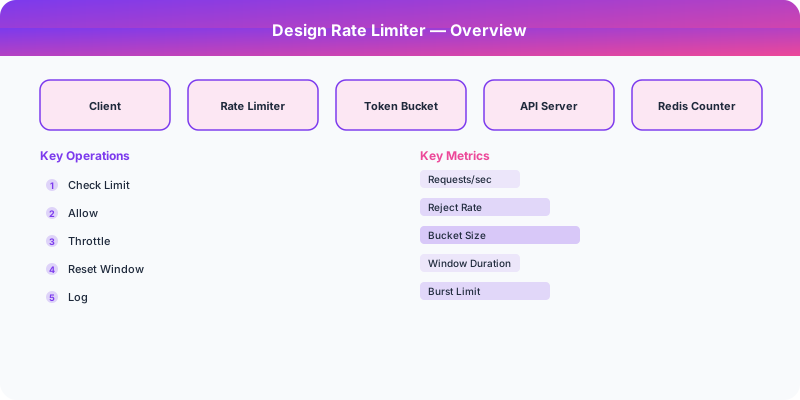
Problem Statement
Design Rate Limiter: Token Bucket, Sliding Window and Redis as a traffic-management problem where overload behavior matters more than the happy-path diagram. For Design Rate Limiter: Token Bucket, Sliding Window and Redis, name the critical user action, the data that must remain correct, and the first bottleneck that appears when traffic grows.
Deep-Dive: Clarifying Questions for Rate Limiter Design
- Where in the stack? Client-side, API gateway level, application level, or all three? Each layer has different tradeoffs.
- What counting granularity? Per user (API key), per IP, per endpoint, or a combination? Corporate NAT can put thousands of users behind one IP.
- Distributed or single-node? If you have 50 API servers, rate limits must be coordinated. A user hitting different servers should still be rate limited globally.
- What happens when rate limited? Drop the request? Queue it? Return HTTP 429 with Retry-After header?
- What algorithms should we support? Token bucket (allows bursts), sliding window (precise), fixed window (simple), leaky bucket (smooth rate)?
- Soft or hard limits? Should limits be strict (exactly 100 requests/minute) or approximate (roughly 100, with brief bursts allowed)?
Specific Functional Requirements
- Configurable Rate Rules: Define rate limits per API key, per endpoint, per IP, or any combination (e.g., "100 requests/minute for /api/search per API key")
- Multiple Algorithms: Support token bucket (burst-friendly), sliding window (precise), and fixed window (simple)
- Distributed Counting: Rate limits are consistent across all API servers using centralized counting
- Informative Responses: Return HTTP 429 with X-RateLimit-Limit, X-RateLimit-Remaining, X-RateLimit-Reset, and Retry-After headers
- Low Latency: Rate limit check must add under 1ms of latency to each request
- Tiered Limits: Different rate limits for free, basic, pro, and enterprise API tiers
- Monitoring: Dashboard showing rate limit hit rates per rule, per API key, per endpoint
Specific Internal API (Rate Limiter as a Service)
POST /ratelimit/check
  Body: { "key": "apikey_123:/api/search", "limit": 100, "window_seconds": 60, "algorithm": "sliding_window" }
  Response: { "allowed": true, "remaining": 72, "reset_at": 1234567890, "retry_after": null }

POST /ratelimit/check (rate limited response)
  Response: { "allowed": false, "remaining": 0, "reset_at": 1234567920, "retry_after": 28 }

GET /ratelimit/rules
  Response: { "rules": [{ "pattern": "/api/search", "limit": 100, "window": 60, "tier": "free" }, ...] }

PUT /ratelimit/rules/:rule_id
  Body: { "limit": 200, "window": 60 }
  Response: { "rule_id": "r_123", "updated": true }

Redis implementation (sliding window counter):
-- Lua script for atomic sliding window rate limiting
local key = KEYS[1]
local window = tonumber(ARGV[1])
local limit = tonumber(ARGV[2])
local now = tonumber(ARGV[3])
redis.call('ZREMRANGEBYSCORE', key, 0, now - window)
local count = redis.call('ZCARD', key)
if count < limit then
  redis.call('ZADD', key, now, now .. math.random())
  redis.call('EXPIRE', key, window)
  return {1, limit - count - 1}
end
return {0, 0}
Specific Data Model
Rate Limit Rules (PostgreSQL)
| Column | Type | Notes |
|---|---|---|
| rule_id | UUID | Primary key |
| endpoint_pattern | VARCHAR | e.g., "/api/v1/search", "/api/v1/*" |
| tier | ENUM | free, basic, pro, enterprise |
| limit_count | INT | Max requests allowed |
| window_seconds | INT | Time window |
| algorithm | ENUM | token_bucket, sliding_window, fixed_window |
Rate Limit Counters (Redis)
- Token Bucket: Key = "tb:API_KEY:ENDPOINT", Value = (tokens: N, last_refill: timestamp)
- Sliding Window: Key = "sw:API_KEY:ENDPOINT", Value = Sorted Set of request timestamps
- Fixed Window: Key = "fw:API_KEY:ENDPOINT:WINDOW_START", Value = counter (integer)
Rate Limit Metrics (Time-series DB / InfluxDB)
| Field | Type | Notes |
|---|---|---|
| api_key | TAG | For per-key analysis |
| endpoint | TAG | For per-endpoint analysis |
| allowed_count | FIELD | Requests that passed |
| rejected_count | FIELD | Requests that were rate limited |
| timestamp | TIME | 1-minute granularity |
Specific Back-of-the-Envelope Numbers
Traffic:
- API receives 100,000 requests/second at peak
- Each request requires one rate limit check = 100K Redis operations/second
- Redis single instance handles ~100K operations/second — need sharding or clustering for higher throughput
Memory (Redis):
- Token bucket: 1 key per (API key, endpoint) combination. 1M API keys * 10 endpoints = 10M keys * 100 bytes = 1 GB
- Sliding window: stores each request timestamp. 1M keys * 100 timestamps * 16 bytes = 1.6 GB. More memory-intensive but more precise.
- Fixed window: 1 key per (API key, endpoint, window). Same as token bucket memory but keys auto-expire.
Latency:
- Redis lookup: 0.1-0.5ms (local network)
- Lua script execution: 0.05ms
- Total rate limit overhead: under 1ms per request (target: under 0.5ms)
Availability:
- Rate limiter must be as available as the API itself
- If Redis is down: fail OPEN (allow all requests) for availability-focused systems, fail CLOSED (reject all) for security-focused systems
- Use Redis Sentinel or Redis Cluster for high availability
Original DosiBridge notes for Design Rate Limiter: Token Bucket, Sliding Window and Redis
This section is written specifically for this page, not copied from a general system-design checklist. The useful way to study Design Rate Limiter: Token Bucket, Sliding Window and Redis is to connect the concept to a traffic-management problem where overload behavior matters more than the happy-path diagram. That framing changes the design discussion from definitions to operating choices.
What makes this topic distinct
- Core Entity: For Design Rate Limiter: Token Bucket, Sliding Window and Redis, decide the core entity before choosing tools; otherwise the design looks clean but fails when design changes.
- Read/Write Path: For Design Rate Limiter: Token Bucket, Sliding Window and Redis, decide the read/write path before choosing tools; otherwise the design looks clean but fails when rate changes.
- Contention Point: For Design Rate Limiter: Token Bucket, Sliding Window and Redis, decide the contention point before choosing tools; otherwise the design looks clean but fails when limiter changes.
- Abuse Path: For Design Rate Limiter: Token Bucket, Sliding Window and Redis, decide the abuse path before choosing tools; otherwise the design looks clean but fails when design changes.
- Recovery Workflow: For Design Rate Limiter: Token Bucket, Sliding Window and Redis, decide the recovery workflow before choosing tools; otherwise the design looks clean but fails when rate changes.
Design Rate Limiter: Token Bucket, Sliding Window and Redis correctness boundary
For this problem, separate the user-visible action from background work. The correctness boundary is the smallest state transition that must not be duplicated, lost, or reordered. Naming that boundary makes the solution more original than a stock API/database/cache template.
Design Rate Limiter: Token Bucket, Sliding Window and Redis scaling bottleneck
The first bottleneck should be described in the language of this system: a hot timeline, a contested seat, a busy wallet ledger, a media-processing queue, or a search index update delay. That bottleneck decides which component deserves the deepest interview discussion.
Production review question
If Design Rate Limiter: Token Bucket, Sliding Window and Redis suddenly receives 10x traffic, which entity becomes contested first, and what queue, lock, shard, or cache protects that entity without hiding correctness bugs?
Practical metric to track
Track design-limiter health as a named dashboard or review item: combine one user-facing metric, one saturation metric, and one correctness metric. For Design Rate Limiter: Token Bucket, Sliding Window and Redis, this keeps the discussion grounded in behavior that can be measured after deployment instead of generic advice that sounds good in an interview but never gets verified.