Design Zoom: WebRTC, SFU, Meetings and Recording Architecture
Solve the Zoom system design interview: WebRTC, SFU media routing, meeting control plane, screen sharing, recording, NAT traversal, and scaling.
Quick answer: Design Zoom: WebRTC, SFU, Meetings and Recording Architecture
Design Zoom: WebRTC, SFU, Meetings and Recording Architecture is covered here as a practical system design interview problem. Solve the Zoom system design interview: WebRTC, SFU media routing, meeting control plane, screen sharing, recording, NAT traversal, and scaling. Use it to practice requirements, APIs, storage choices, scaling bottlenecks, data consistency, observability, and failure handling for a hard interview round.
Focus on the problem being solved, the main design choice, the failure mode, and the tradeoff you would defend in front of a senior engineer. This page is part of the DosiBridge system design knowledge graph, so it links related concepts, interview problems, tradeoffs, and references instead of leaving the topic isolated.
Problem Statement
Design a video conferencing platform like Zoom supporting 1-on-1 calls, group meetings (up to 1000 participants), screen sharing, meeting recording, and virtual backgrounds. The system must handle real-time audio/video with <200ms end-to-end latency, adapt to varying network conditions, and traverse NATs/firewalls.
Requirements
Functional
- Create/join meetings with a meeting ID; host controls (mute, remove, breakout rooms)
- Real-time audio and video streaming between all participants
- Screen sharing: one participant shares their screen, visible to all
- Meeting recording: save audio/video/screen share to cloud storage for later playback
Non-Functional
- Latency: <150ms glass-to-glass for audio, <200ms for video (same continent)
- Scale: 300M daily meeting participants, 100K concurrent meetings, up to 1000 participants per meeting
- Reliability: Graceful degradation -- reduce video quality before dropping participants
- NAT traversal: Works behind corporate firewalls and symmetric NATs
Core Architecture
-
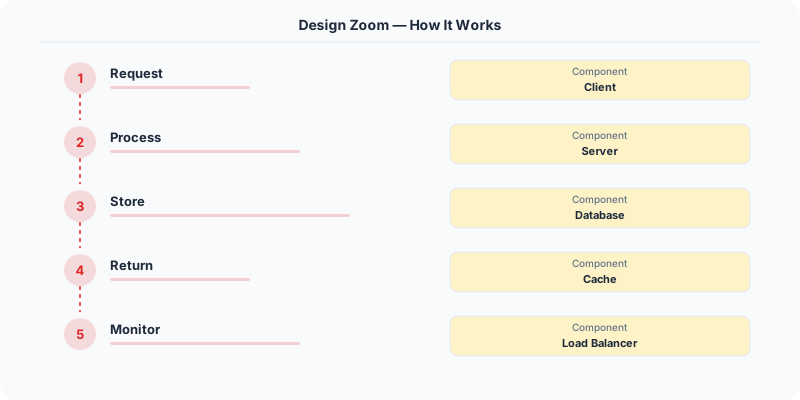
Signaling Server -- WebSocket-based server that handles meeting creation, participant join/leave, and SDP (Session Description Protocol) exchange for WebRTC handshake. Does not carry media -- only control messages. Coordinates which SFU node each participant should connect to.
-
SFU (Selective Forwarding Unit) -- The media server. Each participant sends one audio and one video stream to the SFU. The SFU selectively forwards streams to other participants without transcoding (unlike an MCU). For large meetings (>50 participants), the SFU only forwards the active speaker's video and thumbnail-quality streams for the rest. Deployed in multiple regions; participants connect to the nearest SFU.
-
TURN/STUN Servers for NAT Traversal -- STUN servers help clients discover their public IP and port (works for ~80% of NATs). For symmetric NATs and firewalls that block UDP, TURN servers relay media traffic through a publicly reachable server. TURN is expensive (all media flows through it), so it is used only as a fallback.
-
Recording Service -- A headless participant joins the meeting on a server, receives all streams via the SFU, and composites them into a single video file (speaker view or gallery view). Audio streams are mixed server-side. The recording is encoded to H.264 and uploaded to S3 in chunks. Available for download/playback within minutes of meeting end.
-
Adaptive Bitrate Controller -- Each client monitors network conditions (packet loss, RTT, available bandwidth) using RTCP feedback. When bandwidth drops, the client: (1) reduces video resolution (1080p -> 720p -> 360p -> audio-only), (2) drops non-speaker video streams, (3) increases audio FEC (Forward Error Correction) to protect speech quality. This happens within 2 seconds of detecting congestion.
Database Choice
PostgreSQL for user accounts, meeting metadata (scheduled meetings, participants, settings), and recording metadata. Redis for real-time meeting state: active participants, mute status, speaker detection, and room assignments. S3 for recorded meeting files. The media pipeline itself uses no database -- media streams are forwarded in real-time through the SFU without storage (except for recording).
Key API Endpoints
POST /api/v1/meetings
  -> Body: \{ host_id: "U1", scheduled_time: "...", settings: \{ max_participants: 100, recording: true \} \}
  -> Returns: \{ meeting_id: "M-123456", join_url: "https://meet.example.com/M-123456" \}

WebSocket /ws/signaling/\{meeting_id\}
  -> Client sends: \{ type: "join", sdp_offer: "v=0..." \}
  -> Server responds: \{ type: "answer", sdp_answer: "v=0...", ice_candidates: [...] \}
  -> Server pushes: \{ type: "participant_joined", user_id: "U2", stream_id: "S2" \}

POST /api/v1/meetings/\{meeting_id\}/recordings
  -> Returns: \{ recording_url: "https://s3.../M-123456.mp4", duration_min: 45, size_mb: 680 \}
Scaling Insight
The SFU architecture is what makes large meetings possible. In a peer-to-peer mesh, each participant sends their stream to every other participant (N^2 connections). In a meeting of 100 people, that is 9,900 streams -- impossible. With an SFU, each participant sends 1 stream and receives N-1 streams from the SFU. For large meetings (>49 participants), the SFU sends only the active speaker at full quality and others at thumbnail quality, reducing downstream bandwidth from 49 HD streams to 1 HD + 48 thumbnail streams (~90% bandwidth reduction).
Key Tradeoffs
| Decision | Option A | Option B | Chosen |
|---|---|---|---|
| Media server | MCU (mix all streams) | SFU (forward selectively) | SFU -- no transcoding cost, lower latency, scales to 1000 participants |
| Transport | TCP (reliable) | UDP (low latency) | UDP (via WebRTC) -- lost packets are acceptable for real-time media; retransmission causes stutter |
| NAT traversal | TURN always (reliable) | STUN first, TURN fallback | STUN first -- 80% of clients connect directly, TURN only for the 20% behind strict NATs |
Original DosiBridge notes for Design Zoom: WebRTC, SFU, Meetings and Recording Architecture
This section is written specifically for this page, not copied from a general system-design checklist. The useful way to study Design Zoom: WebRTC, SFU, Meetings and Recording Architecture is to connect the concept to a media-heavy path where network variance, buffering, and edge placement decide the user experience. That framing changes the design discussion from definitions to operating choices.
What makes this topic distinct
- Core Entity: For Design Zoom: WebRTC, SFU, Meetings and Recording Architecture, decide the core entity before choosing tools; otherwise the design looks clean but fails when zoom changes.
- Read/Write Path: For Design Zoom: WebRTC, SFU, Meetings and Recording Architecture, decide the read/write path before choosing tools; otherwise the design looks clean but fails when zoom changes.
- Contention Point: For Design Zoom: WebRTC, SFU, Meetings and Recording Architecture, decide the contention point before choosing tools; otherwise the design looks clean but fails when zoom changes.
- Abuse Path: For Design Zoom: WebRTC, SFU, Meetings and Recording Architecture, decide the abuse path before choosing tools; otherwise the design looks clean but fails when zoom changes.
- Recovery Workflow: For Design Zoom: WebRTC, SFU, Meetings and Recording Architecture, decide the recovery workflow before choosing tools; otherwise the design looks clean but fails when zoom changes.
Design Zoom: WebRTC, SFU, Meetings and Recording Architecture correctness boundary
For this problem, separate the user-visible action from background work. The correctness boundary is the smallest state transition that must not be duplicated, lost, or reordered. Naming that boundary makes the solution more original than a stock API/database/cache template.
Design Zoom: WebRTC, SFU, Meetings and Recording Architecture scaling bottleneck
The first bottleneck should be described in the language of this system: a hot timeline, a contested seat, a busy wallet ledger, a media-processing queue, or a search index update delay. That bottleneck decides which component deserves the deepest interview discussion.
Production review question
If Design Zoom: WebRTC, SFU, Meetings and Recording Architecture suddenly receives 10x traffic, which entity becomes contested first, and what queue, lock, shard, or cache protects that entity without hiding correctness bugs?
Practical metric to track
Track zoom health as a named dashboard or review item: combine one user-facing metric, one saturation metric, and one correctness metric. For Design Zoom: WebRTC, SFU, Meetings and Recording Architecture, this keeps the discussion grounded in behavior that can be measured after deployment instead of generic advice that sounds good in an interview but never gets verified.
Sources
Unique design focus: real-time media under changing networks
Zoom is not mainly a chat app with video. The central challenge is delivering low-latency audio and video while participant networks constantly change. The design must prioritize audio continuity, adapt video quality, and route media efficiently across regions.
Core components
- Signaling service: meeting creation, join flow, participant state, permissions, device negotiation.
- Media transport: WebRTC/RTP streams for audio, video, and screen share.
- SFU layer: Selective Forwarding Units receive streams and forward selected qualities to participants.
- Chat and reactions: lower-priority data path that should not disrupt media.
- Recording service: stores mixed or individual streams asynchronously.
Why SFU matters
In a mesh call, every participant sends media to every other participant. That breaks quickly as meeting size grows. With an SFU, clients upload one or a few streams, and the server forwards suitable streams to others. The SFU usually does not fully decode and re-encode like an MCU, which keeps latency lower and cost more manageable.
Adaptive behavior
- Prioritize audio over video when bandwidth drops.
- Use simulcast or scalable video coding so clients can receive different resolutions.
- Detect packet loss, jitter, and round-trip time continuously.
- Switch media region or SFU when a participant's network path becomes poor.
- Reduce frame rate or resolution before disconnecting the user.
Meeting lifecycle
- User creates or joins a meeting through signaling.
- Auth and waiting-room policy are checked.
- Client receives media routing information.
- Client publishes audio/video to the nearest healthy SFU.
- SFU forwards selected streams to other participants based on layout and bandwidth.
- Events update participant list, mute state, screen sharing, chat, and recording.
Failure handling
If one SFU fails, clients reconnect to another and resume media. If recording falls behind, the meeting should continue and the recording pipeline catches up or marks partial failure. If chat is degraded, audio/video remain the priority.