How Slack Delivers Messages in Real Time
Quick answer: How Slack Delivers Messages in Real Time
How Slack Delivers Messages in Real Time is covered here as a practical system design article. Inside Slack's real-time messaging architecture — WebSocket connections, message fanout, channel routing, and how they handle millions of concurrent users. Use it to turn a broad system design idea into an interview-ready checklist with practical examples and links to deeper topics.
Focus on the problem being solved, the main design choice, the failure mode, and the tradeoff you would defend in front of a senior engineer. This page is part of the DosiBridge system design knowledge graph, so it links related concepts, interview problems, tradeoffs, and references instead of leaving the topic isolated.
How Slack Delivers Messages in Real Time
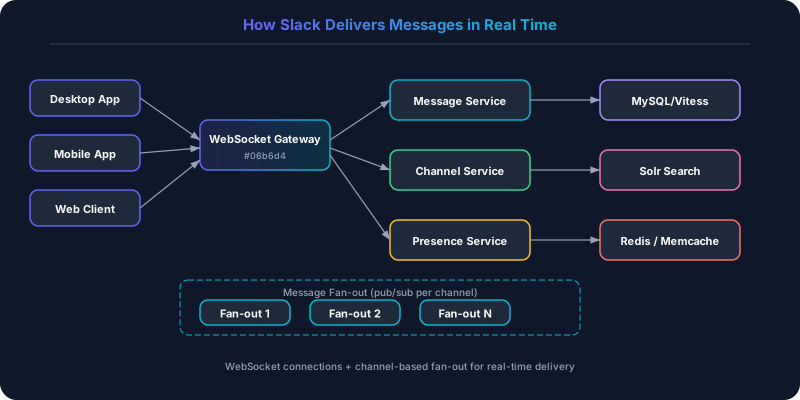
Slack handles millions of concurrent WebSocket connections, delivering messages with sub-second latency. When you type in a channel, every member of that channel sees your message appear within 200-500ms, regardless of whether they are on desktop, mobile, or web.
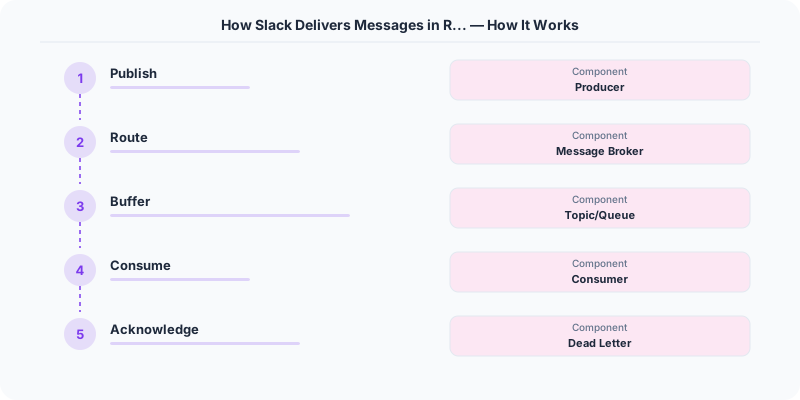
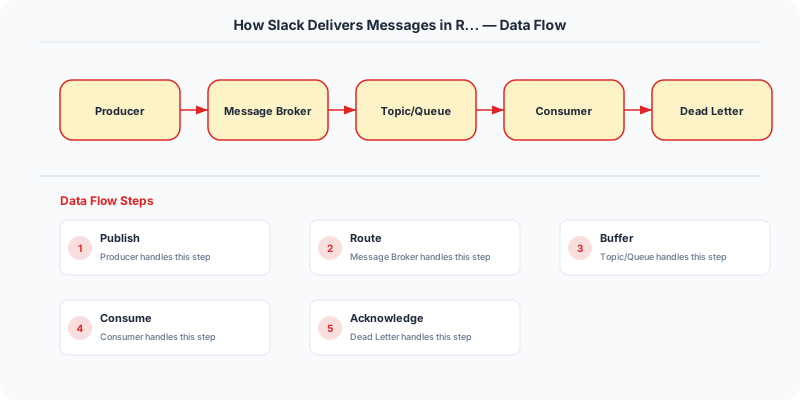
The Message Path
1. Client Sends Message
When you press Enter, your Slack client sends the message over its WebSocket connection to the nearest Slack edge server. The message includes: channel_id, text, sender_id, client-generated nonce (for deduplication).
2. Message Service Processes
The edge server forwards to the Message Service, which:
- Validates permissions (is this user in this channel?)
- Stores the message in MySQL (sharded by workspace)
- Assigns a server-generated message ID (monotonically increasing per channel for ordering)
- Publishes a "message.created" event to the internal message bus
3. Channel Fanout
The Message Fanout Service receives the event and determines who needs to be notified:
- Fetch channel membership list
- For each online member: look up which gateway server holds their WebSocket connection
- Forward the message to each relevant gateway server
4. Gateway Delivers to Client
Each gateway server maintains ~500K WebSocket connections. When it receives a message for a user, it pushes the message through their WebSocket. The client renders it instantly.
For offline users: the message is stored in the database. When they reconnect, the client requests messages since their last-seen timestamp.
Key Technical Decisions
Why WebSocket, Not Polling?
Slack tried long polling early on. At 50K concurrent users, the overhead of HTTP headers on every poll (100+ bytes) added up. WebSocket reduced bandwidth by 90% and latency from seconds to milliseconds.
Channel-Level Ordering
Messages within a channel must arrive in order. Slack achieves this by:
- Assigning sequential IDs per channel from the message service (single-writer per channel)
- Clients display messages sorted by this server-assigned ID
- If a message arrives out of order (e.g., due to network delay), the client re-sorts
Workspace Sharding
Slack shards data by workspace (organization). Each workspace's messages, channels, and users live on a dedicated MySQL shard (via Vitess). This provides natural isolation — one workspace's traffic spike does not affect others.
Presence (Who's Online?)
Tracking online/offline status for millions of users is its own challenge. Slack uses:
- Redis with TTL keys: each connected user has a key that expires in 30 seconds
- Clients send a heartbeat every 15 seconds to refresh the TTL
- If the key expires, the user is marked offline
- Presence changes are broadcast to relevant channels (not all users — just channel members)
Performance at Scale
| Metric | Value |
|---|---|
| Concurrent WebSocket connections | Millions |
| Message delivery latency | 200-500ms |
| Messages per second (peak) | 100K+ |
| MySQL shards | Thousands (via Vitess) |
| Gateway servers | Hundreds |
Key Takeaways
- WebSocket for real-time: The latency and bandwidth advantages over polling are enormous
- Shard by workspace: Natural isolation boundary for multi-tenant SaaS
- Channel-level ordering: Per-channel sequential IDs are simpler than global ordering
- Vitess for MySQL sharding: Proven at scale (Slack, YouTube, GitHub)
- Presence via Redis TTL: Elegant, simple, and scalable
Original DosiBridge notes for How Slack Delivers Messages in Real Time
This section is written specifically for this page, not copied from a general system-design checklist. The useful way to study How Slack Delivers Messages in Real Time is to connect the concept to a production service where growth exposes the first weak assumption in the original design. That framing changes the design discussion from definitions to operating choices.
What makes this topic distinct
- Practical Lesson: For How Slack Delivers Messages in Real Time, decide the practical lesson before choosing tools; otherwise the design looks clean but fails when how changes.
- Migration Story: For How Slack Delivers Messages in Real Time, decide the migration story before choosing tools; otherwise the design looks clean but fails when slack changes.
- Production Symptom: For How Slack Delivers Messages in Real Time, decide the production symptom before choosing tools; otherwise the design looks clean but fails when delivers changes.
- Decision Checklist: For How Slack Delivers Messages in Real Time, decide the decision checklist before choosing tools; otherwise the design looks clean but fails when messages changes.
- Rollback Plan: For How Slack Delivers Messages in Real Time, decide the rollback plan before choosing tools; otherwise the design looks clean but fails when in changes.
Production review question
If a team adopts How Slack Delivers Messages in Real Time, what observable signal proves it helped instead of only making the architecture diagram more fashionable?
Practical metric to track
Track how-time health as a named dashboard or review item: combine one user-facing metric, one saturation metric, and one correctness metric. For How Slack Delivers Messages in Real Time, this keeps the discussion grounded in behavior that can be measured after deployment instead of generic advice that sounds good in an interview but never gets verified.
Sources
Putting This Into Practice
Understanding the theory is only half the battle. Here is how to apply these concepts in your daily work:
Start small. Pick one project or one component of your current system and apply the ideas from this article. Do not try to redesign everything at once.
Document your decisions. When you make an architectural choice, write a short ADR (Architecture Decision Record) explaining what you chose, why, and what alternatives you considered. Future you will thank present you.
Talk to your team. System design is a team sport. Share what you learn, discuss tradeoffs openly, and build shared understanding. The best architectures come from teams that communicate well, not from lone geniuses.
Key Takeaways
- Every design decision involves tradeoffs — there is no perfect solution
- Start simple and evolve as requirements grow
- Measure before optimizing — premature optimization wastes engineering time
- Learn from production incidents — they teach you more than any textbook
- Practice explaining your reasoning — this is what interviews test